NYT Connections #983: Hints and solutions for February 18, 2026

The Wednesday edition of NYT Connections arrives with puzzle #983, serving up a grid that rewards retro culture knowledge and agricultural terminology. Today’s challenge particularly favors those who remember 80s slang and can spot sneaky poultry descriptors.

What Makes Connections Tick

For newcomers, NYT Connections presents 16 words that must be sorted into four thematic groups of four.

The twist?

You’re limited to four mistakes, and the color-coded difficulty system (yellow being easiest, purple being trickiest) means surface-level connections often mislead.

Since its June 2023 launch, Connections has carved out its niche in the Times’ puzzle ecosystem, standing alongside Wordle and the crossword as a daily ritual for millions of players worldwide.

The game’s genius lies in its red herrings, words that could fit multiple categories but belong in only one.

Today’s Grid at a Glance

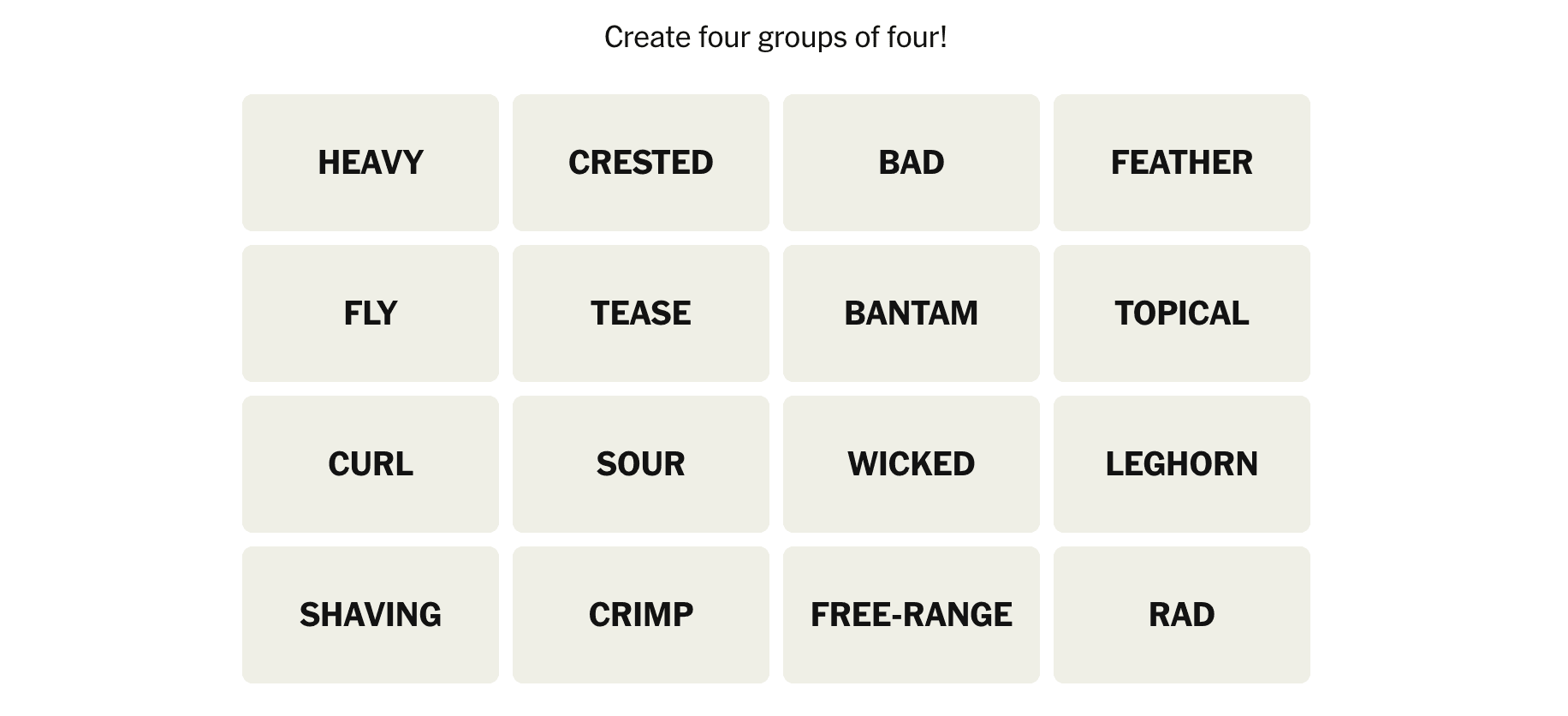
Here are the 16 words staring back at you in puzzle #983:

HEAVY | CRESTED | BAD | FEATHER

FLY | TEASE | BANTAM | TOPICAL

CURL | SOUR | WICKED | LEGHORN

SHAVING | CRIMP | FREE-RANGE | RAD

A seemingly random collection that somehow connects into four perfect categories.

Strategic Hints (No Spoilers Yet)

Yellow Category Nudge: Think about hairstyles that were popular in the 80s and 90s.

Green Category Clue: These words all meant “cool” or “excellent” in different decades.

Blue Category Hint: These terms describe different types or characteristics of chickens.

Purple Category Teaser: Each of these words can precede “cream” to form a common phrase.

The Full Solutions

Last chance to solve independently: answers below

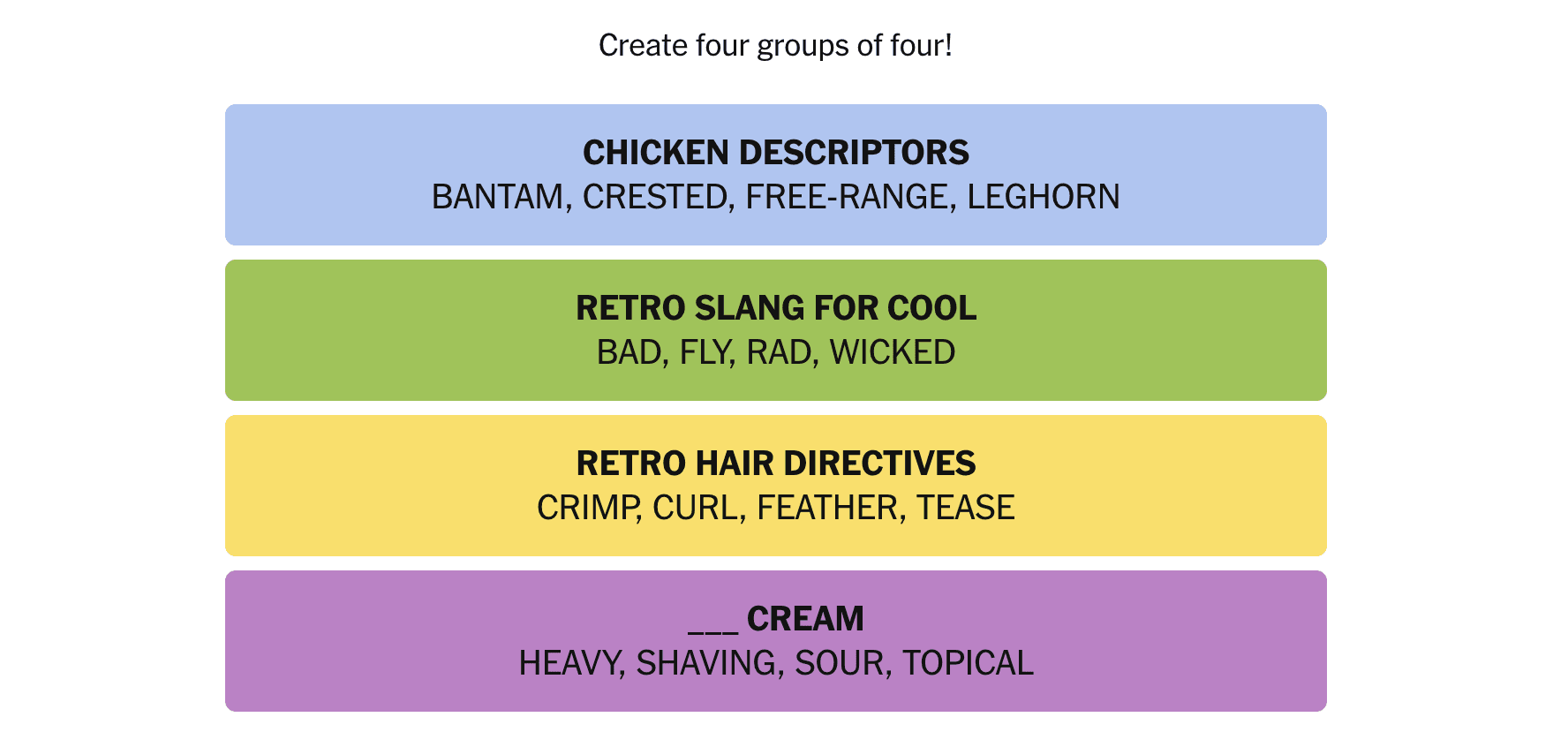
Yellow (Retro Hair Directives): CRIMP, CURL, FEATHER, TEASE

These four words all refer to specific hair styling techniques that were particularly popular in the 70s and 80s.

Crimping creates zigzag waves, curling adds spiral texture, feathering involves layered cutting, and teasing (or backcombing) adds volume at the roots.

Green (Retro Slang for Cool): BAD, FLY, RAD, WICKED

This category collects slang terms that all meant “cool” or “excellent” across different decades and subcultures.

“Bad” ironically meant good in 70s funk culture, “fly” emerged from 80s hip-hop, “rad” was quintessential 80s skate/surf slang, and “wicked” served as New England’s positive intensifier.

Blue (Chicken Descriptors): BANTAM, CRESTED, FREE-RANGE, LEGHORN

These terms all describe specific types or characteristics of chickens.

Bantam refers to small chicken breeds, crested describes breeds with distinctive head feathers, free-range indicates chickens with outdoor access, and Leghorn is a specific breed known for egg production.

Purple (___ Cream): HEAVY, SHAVING, SOUR, TOPICAL

Each of these words can precede “cream” to form common phrases.

Heavy cream is a dairy product, shaving cream is for grooming, sour cream is a condiment, and topical cream refers to medicinal ointments applied to the skin.
The Verdict

Puzzle #983 registers as moderate difficulty with a clever thematic split.

Yellow falls quickly for anyone who remembers 80s hairstyles, while green requires thinking about slang evolution across decades.

Blue separates the agricultural enthusiasts from the casual observers.

Purple, predictably, is the streak-ender, the “cream” connection won’t reveal itself without serious lateral thinking about common two-word phrases.

The real trap lies in words like “HEAVY” and “WICKED,” which could easily mislead solvers into thinking about weight or morality rather than their specific category roles.

“CRESTED” might initially suggest birds in general rather than specifically chicken breeds, while “TOPICAL” could distract with its multiple meanings.

Reset and Repeat

Tomorrow’s puzzle drops at midnight in your timezone.

Until then, reflect on today’s performance: did the retro hair terms come naturally, or did the chicken descriptors stump you?

The beauty lies not in perfection but in training your brain to spot these hidden patterns.

For now, puzzle #983 is solved.

See you at midnight for round #984.

NYT Connections #983: Hints and Solutions for February 18, 2026 – Originally published on Sohh.com


This budget-friendly flagship puts a retro gaming screen on your phone’s back

As we edge ever closer to the smartphone singularity, it’s nice to see at least one brand remembering to make handsets that are fun as well as functional. Infinix has given its latest sensibly-priced mid-ranger an active Matrix LED display, turning its Apple-aping rear camera island into a retro-style games machine that can also give you a heads-up on incoming notifications.

The Note 60 Pro is also the firm’s first in a long while with Snapdragon silicon, signalling a step out of true bargain territory and more into the mainstream. A sizeable battery and speedy charging add to the appeal.

I’ve been trying one out ahead of the launch. While a full review will have to wait until I’ve had more time for testing, first impressions are mostly positive – making me wish Infinix had a larger presence outside of its African and Indian heartland.

With a metal frame, rounded corners and a flat AMOLED display with satisfyingly skinny bezels, the Note 60 Pro punches above its weight in the looks department. It’s slender at a mere 7.45mm, but has a decent amount of heft to it. You’d be hard-pressed to pick it out as an affordable handset on design alone.

My Deep Ocean Blue review sample is one of the more eye-catching colours, along with Solar Orange; there’s also Mist Titanium,

Mocha Brown and Frost Silver, while the Torino Black model was co-created with supercar design house Pininfarina.

There’s an undeniable Apple influence, right down to the phone-spanning rear camera island, but the firm has gone against the grain with rectangular shapes and a colour-shifting Halo light ring (a Note series staple).

Then there’s the customisable Active Matrix LED display, which lurks invisibly under the mirror-like polycarbonate until a notification comes in or you shake the phone to show the current time. There’s also a bunch of minigames you can play using the side buttons. While I’ve seen these kinds of screens on other phones, the Nothing Phone 3‘s glyph matrix came with divisive styling and the Asus ROG Phone 9 Pro was ruinously expensive.

The Matrix LEDs are neither this phone’s defining feature, or used to justify an exorbitant asking price.

You’re really getting a lot for your money here, with an under-display fingerprint sensor, FM radio, IR blaster, and a configurable One-Tap button at the side that works a bit like the Plus Key on recent OnePlus phones. I used it to toggle volume modes, but it can launch the camera app, activate the flashlight or start a voice recording. eSIM support isn’t always a given on budget handsets destined for India and Africa, so it’s great to see it included here. IP64 resistance isn’t class leading, but welcome all the same.

I initially thought the sensor on the Note 60 Pro’s right side was another fingerprint reader, but it’s actually a heart rate monitor. It needs 30 seconds for a reading, and the results were around 10bpm north of what I was getting from the Garmin smartwatch I wear.

There’s little to grumble about in terms of picture quality, with the 6.78in panel really packing in the pixels. Refresh rate caps out at 144Hz and it’ll nudge 4500 nits peak brightness with HDR content. Outdoor visibility was great, and colours had plenty of pop. The JBL-tuned stereo speakers put in a good shift too, with ample volume.

I’ll need more time to give a verdict on the cameras, but so far they’ve delivered the sort of shots I’d expect of an affordable handset. The 50MP lead lens preserves an alright amount of detail, but dynamic range is fairly limited and colours aren’t the most engaging. It can crop in for 2x zoom without a notable hit to quality. The 8MP ultrawide is a step down detail-wise, but seems to do a better job with colour reproduction.

For its first foray back to Snapdragon silicon, Infinix has opted for Qualcomm’s tried-and-tested mid tier chip. The Snapdragon 7s Gen 4 is bang up to date, comes paired with either 8 or 12GB of RAM and 256GB of storage, and represents a big power hike from the MediaTek Helio used in the previous-gen Note 50 Pro.

It was responsive and ran Android 16 smoothly enough, with apps opening fairly quickly and not needing to redraw too often when multitasking. Gaming wasn’t a slog, with 3D titles defaulting to lower graphics presets but hitting fairly high frame rates. I didn’t feel the phone get especially hot during a long play session either.

The Note 60 Pro was my first taste of Infinix’ XOS Android skin. It’s a bit full-on, with multiple homescreen pages filled with preloaded apps and a translucent UI clearly influenced by Apple’s Liquid Glass. It’s nicely customisable, at least, and should be in line for three new Android generations through its lifetime (as well as five years of security patches).

Depending where you live, you’ll either get a 6000mAh or 6500mAh battery inside the Note 60 Pro. That’s quite a gap. I had the latter, which was easily good enough for a day and a half of pretty heavy use, or two days if I took it easy on the screen time. 90W wired charging was a real win, given this is a sensibly-priced mid-ranger. Wireless charging of any kind is a bonus, and 30W is especially speedy.

Initial Stuff Verdict

A confident step into more mid-range territory for Infinix. The Note 60 Pro ticks most boxes, without forgetting a few entertaining elements for good measure.

Pros

  • Slim build and sleek looks
  • Consistent mid-range performance and great battery life
  • Matrix display both fun and functional

Cons

  • No wider global availability
  • OS has lots of preinstalled bloat

The Infinix Note 60 Pro is on sale in the firm’s usual markets – mainly India, Africa and South East Asia – right now. Pricing varies by region.

  • Related: This new thin phone contender doesn’t fall behind on battery

Wny workforce transformation is never just about the tech

Experience has taught me that the hard work lies in developing ‘soft skills’ in leadership and empathy, writes Wendy Edie

When I first started working in learning technology nearly three decades ago, we were just starting to deliver online courses over dial-up connections. Progress bars crept slowly across screens, and simply getting someone logged in felt like an achievement. Today, we’re talking about AI copilots, personalised learning journeys, and evidencing real-time skills development embedded into everyday work.

Technology has changed beyond recognition, but one thing has remained constant for me: successful workforce transformation has never been about the technology alone. In fact, I would say that is the easiest bit. The hard work lies in developing what can be considered ‘soft skills’ in leadership and, crucially, empathy.

That belief is shaped not only by my career but by my life as a mother. My two grown-up children have taken very different paths through education. One is thriving academically at university. The other, who told me after their first day at high school that “this isn’t for me”, has built a career through an apprenticeship in mechanics. Watching them learn in completely different ways has reinforced in me that there is no single route to capability, and technology must never assume there is.

Yet many organisations still fall into the same trap. One of the biggest misconceptions I see among business leaders is the idea that technology itself is the disruption. In reality, the real challenge is organisational mindset. Technology evolves rapidly, we’ve gone from dial-up learning platforms to AI copilots in the space of a generation, but leadership behaviour often changes far more slowly. Companies invest in new tools, while human behaviour means we continue to manage people and skills in outdated ways. As a result, transformation can stall before it begins.

Scotland’s learning technology sector reflects this rapid evolution. What started as a niche technical discipline has become a globally respected ecosystem, fuelled by some great collaboration between educators, businesses, and technologists.

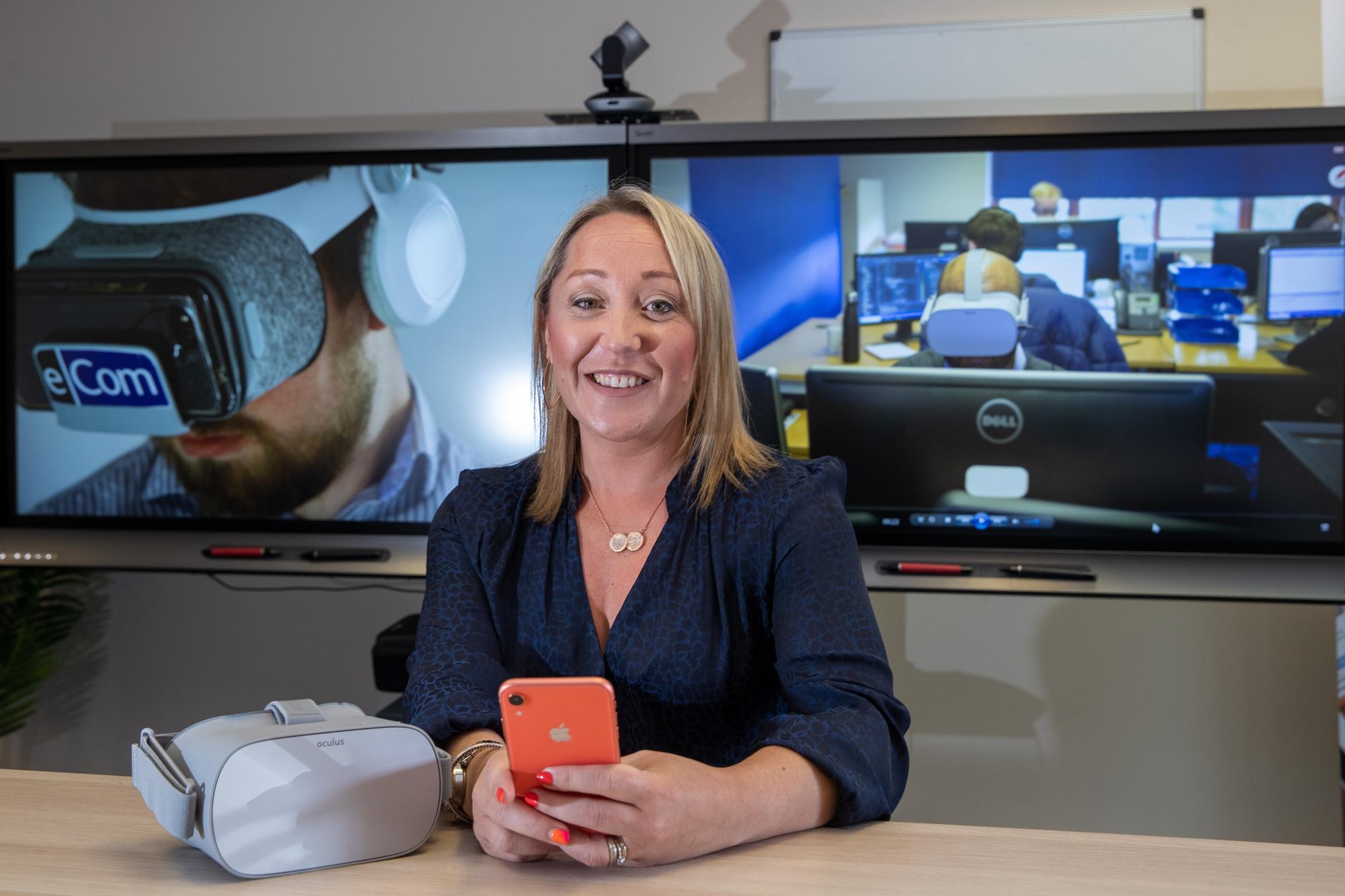
During eCom’s 30 years within innovation in learning technology, I’ve worked on amazing, impactful projects over the years, and now, working on global social change online learning and assessment solutions that are utilising technology the right way. But as artificial intelligence accelerates innovation even further, we need to work hard to keep the focus on the human experience rather than the pace of change.

This is why empathy has become central to how I lead and how I think about workforce development. Empathy-led technology doesn’t mean simpler technology; it means more thoughtful technology. To me, that means building programmes and platforms that adapt to people, whether they’re studying in a university lecture hall or learning new skills between jobs on a workshop floor. Technology should support learning wherever it happens: out in the field or at a desk, online or offline. In fact, one of the great ironies of modern innovation is that, as technology becomes more advanced, reliable offline access has become one of the most important requirements for real-world learning.

As we celebrate 30 years in this industry, I would say that one message is clear. Workforce transformation is not a one-off initiative or even a new platform rollout. It requires a culture where learning is continuous, accessible, and aligned with real work. The organisations that will succeed in the next decade will be those that remove barriers rather than add complexity, and treat empathy as a strategic advantage, not a soft skill.

The journey from those early dial-up courses to today’s AI-powered tools, the pace of innovation is extraordinary. But our real responsibility as leaders is to ensure that, as technology evolves, learning becomes more inclusive, more accessible, and more human – not less.

Wendy Edie, CEO, eCom Learning Solutions

Microsoft confirms new Windows 11 feature drop coming next month

Microsoft has issued a new Windows 11 Release Preview build which gives us our first look at the next feature drop that the company is expected to begin rolling out in the next handful of weeks. This next wave of features is all about quality of life improvements, with Taskbar updates and new Emoji headlining the release.

Windows 11 receives new feature drops on a monthly cadence as part of Microsoft’s “Continuous Innovation” update strategy, which see’s new features ship when they’re ready instead of annually as part of a larger Windows version update.

This next wave of new features includes the new Emoji 16.0 release, which adds a handful of new emoji’s such as a fingerprint emoji, harp emoji, and shovel emoji. These new emoji’s will appear in the Emoji panel on Windows 11, which can be accessed with the Win+. keyboard combination.

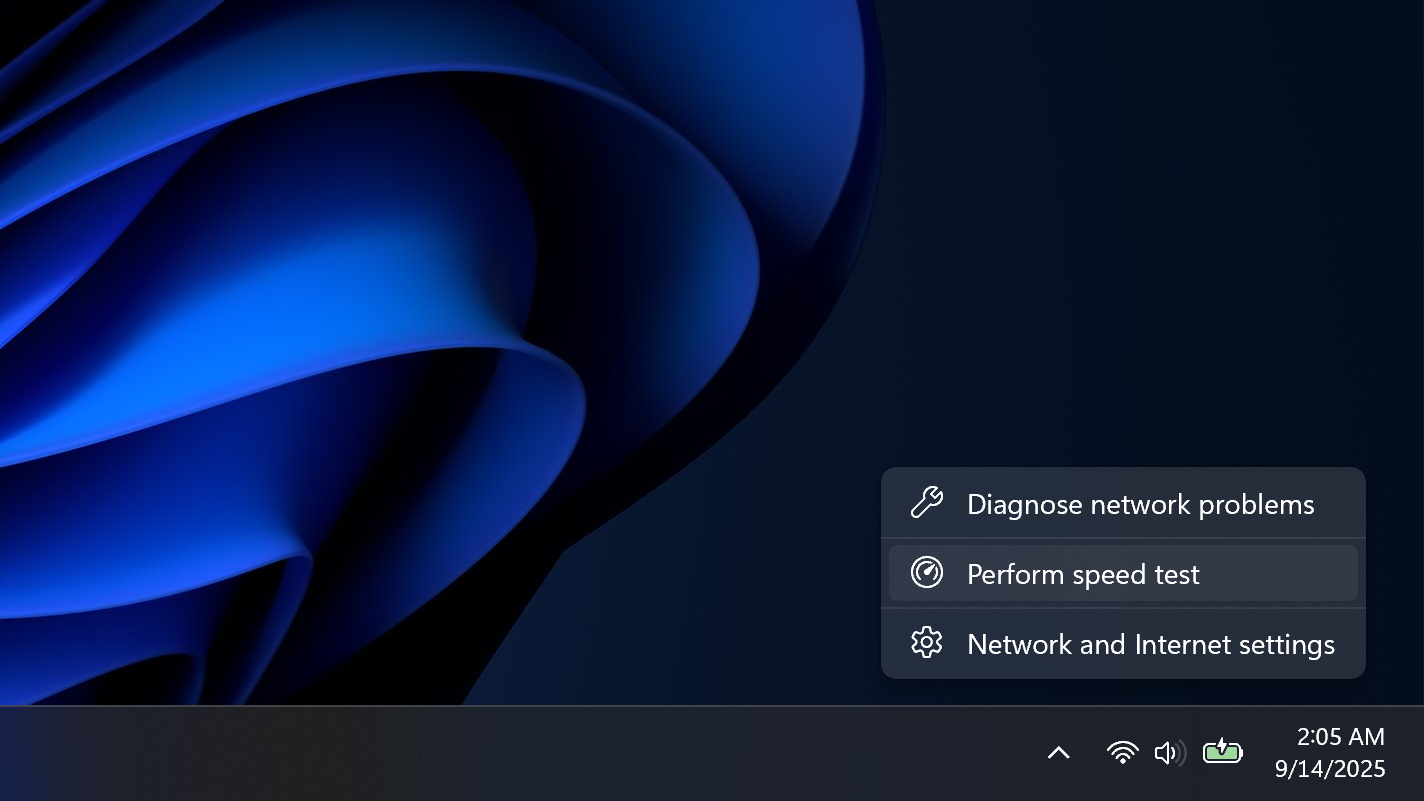
Also new in this next feature drop are improvements to the Taskbar. Microsoft is adding a built-in network speed test shortcut to the Taskbar, which can be accessed by right-clicking the network icon in the system tray. This release also brings in-box Sysmon support, though the feature is disabled by default.

Here’s a complete rundown of the new features Microsoft is now testing with today’s Release Preview build, which are expected to begin rolling out to production PCs in the next few weeks:

  • [Emoji] New! The Emoji 16.0 release introduces a small thoughtfully curated set of new emojis, one from each major category. These new emojis now appear in the emoji panel.
  • [Backup & Restore] New! The first sign-in restore experience is now part of Windows Backup for Organizations, bringing this restore capability to more device types. This experience restores user settings and Microsoft Store apps automatically at first sign-in on Microsoft Entra hybrid joined devices, Cloud PCs, and multi‑user environments. This capability helps create a consistent setup process during device refreshes, upgrades, or migrations.
  • [Quick Machine Recovery] New! Quick Machine Recovery (QMR) now turns on automatically for Windows Professional devices that are not domain‑joined and not enrolled in enterprise endpoint management. These devices receive the same recovery features available to Windows Home users. For domain‑joined or enterprise managed devices, QMR stays off unless it is enabled by the organization.
  • [Taskbar & System Tray]
    • New! A built‑in network speed test is now available from the taskbar. Open it from the Wi‑Fi or Cellular Quick Settings, or by right-clicking the network icon in the system tray. The speed test opens in the default browser and measures Ethernet, Wi‑Fi, and Cellular connections. This feature helps check network performance and troubleshoot issues.
    • Improved: When your taskbar is set to uncombined, if you have an app open with many windows, they will no longer all move as a set to the overflow area when there is not enough space on the taskbar, and instead only the ones specifically within the set that don’t have space. With this change, the overflow area should no longer appear to display with lots of available space.
  • [Accounts] New! A new entry point in the account menu on the Start menu now directs you to the benefits page (https://account.microsoft.com/). This update makes it easier to explore and manage the benefits associated with your Microsoft account.
  • [Identity & Access Management] New! Windows now supports Microsoft Entra ID group and role SID resolution. This update enables Windows to translate Entra cloud group and role security identifiers (SIDs) to readable names, allowing Entra-only groups to be used and displayed correctly in file permissions, local group membership, and access control scenarios without relying on on‑premises or hybrid Active Directory identities.
  • [Camera SettingsNew! You can now control pan and tilt for supported cameras in the Settings app. The controls appear under Settings > Bluetooth & devices > Cameras, in the “Basic settings” section for your selected camera.
  • [Built-in Sysmon] NewWindows now brings Sysmon functionality natively to Windows. Sysmon functionality allows you to capture system events that can help with threat detection, and you can use custom configuration files to filter the events you want to monitor. The captured events are written on the Windows event log, enabling them to be used with security applications and a wide range of use cases.
  • Built-in Sysmon is disabled by default and must be explicitly enabled.
    • Go to Settings > System > Optional features > More Windows features > checking Sysmon or in PowerShell or command prompt:Dism /Online /Enable-Feature /FeatureName:Sysmon
    • To complete the installation, from PowerShell or command prompt run:sysmon -i
    • Note: If you’ve already installed Sysmon from the website, it must be uninstalled before enabling the built-in Sysmon.
  • [Widgets] New! Widget Settings now opens as a full‑page experience in the Widgets app instead of opening in a dialog.
  • [Desktop Background] New! You can now set .webp image files as your desktop background in Settings > Personalization > Background, as well as when right clicking the image in File Explorer.
  • [Search] Improved: Updated icon for the search process in Task Manager to now show a magnifying glass.
  • [Storage Settings]
    • ImprovedUpdated some of the dialogs in Storage Settings to have a more modern design.
    • Improved Performance of scanning for temporary files.
  • [Windows Update Settings] Improves the responsiveness of the settings page.
  • [Login and lock screens] Improves the login screen reliability.
  • [Nearby Sharing] Improves the reliability of sending larger files.
  • [Projecting] Improves the reliability of displaying the project pane after pressing the Windows key plus P.
  • [Printing] Improves the Windows print service (spoolsv.exe) to ensure smoother performance and prevent slowdowns during high‑volume printing.
  • [File Explorer]
    • Improved: Added the extract all option to the File Explorer command bar when browsing non-ZIP archive folders.
    • Fixed: Holding Shift and clicking the File Explorer in the taskbar, or middle clicking, might open the current instance of File Explorer rather than another instance.
    • Improved reliability of displaying devices on the Network page of File Explorer.
  • [Display]
  • Improved: Made display related performance improvements to help reduce PC resume-from-sleep time on heavily loaded systems and other scenarios.
  • Improved: For laptops used with a docking station while the lid is closed, improved reliability of resuming from sleep when connecting to AC power, without needing to open the laptop lid.
  • [Other] Addressed a few small visual issues, including when the taskbar was set to autohide, with the Windows Security pop up credentials fields, and with the print dialog.

All of these new features are now rolling out for Windows Insiders in the Release Preview Channel, and are expected to begin rolling out to everyone running Windows 11 in the next handful of weeks, starting with the non-preview security update for February which is expected to be released before the end of the month.

Join us on Reddit at r/Sohh.comto share your insights and discuss our latest news, reviews, and more.

Like this article? For more stories like this, follow us on MSN by clicking the +Follow button at the top of this page.

Mark Cuban challenges grim predictions claiming software jobs wipeout due to AI

In the midst of mounting panic over artificial intelligence, billionaire Mark Cuban has delivered a blunt rebuttal to claims that a software job wipeout is inevitable. The debate over AI and employment has intensified in recent months, with industry leaders and analysts warning that automation could erase millions of roles. Software engineers, long seen as beneficiaries of technological change, now find themselves at the centre of the storm.

Yet Cuban, the outspoken entrepreneur and former Shark Tank investor, is pushing back hard against the narrative that AI will decimate software jobs. Speaking in response to reports that artificial intelligence could replace programmers at scale, he questioned the logic behind such sweeping forecasts. Cuban challenged those predicting a software job wipeout by pointing to the sheer scale of the technology industry in the United States.

Who Will Build The Future?

Cuban’s central argument is disarmingly simple. If AI truly wipes away software jobs, who will build and manage the vast ecosystem of technology companies that depend on human expertise? He reportedly highlighted that there are roughly 33 million technology-related companies in the US. ‘If AI wipes away software jobs, who will work at the 33 million technology companies in the US?’ he asked, casting doubt on the sweeping assumptions driving the narrative.

For Cuban, the idea that AI will entirely replace programmers ignores how businesses actually operate. Technology evolves, but it also creates new layers of demand.

AI as a Tool, Not a Replacement

Cuban has long positioned himself as a pragmatic observer of innovation. Rather than viewing AI as a job destroyer, he frames it as a tool that amplifies human capability. In his view, AI will transform how developers work, not eliminate them. Routine coding tasks may be automated, but higher-level thinking, system design, and problem-solving will remain deeply human responsibilities.

He has previously argued that technological shifts often spark fears that fail to materialise at the scale predicted. The same anxieties surfaced during the rise of the internet and cloud computing. Yet, instead of mass job losses, those innovations produced new roles and entirely new sectors.

Challenging the Fear Narrative

The intensity of current warnings about AI has unsettled many young professionals considering careers in programming. Social media platforms are filled with posts suggesting that coding may soon be obsolete. Cuban’s challenge cuts directly into this climate of uncertainty. By questioning who will staff millions of tech firms if programmers vanish, he reframes the conversation.

He does not deny that AI will disrupt certain roles. Instead, he disputes the apocalyptic tone that suggests a total collapse of software employment.

Economic Reality Versus Tech Hype

Predictions of widespread job losses often rely on rapid improvements in generative AI tools. These systems can now produce code snippets, debug errors, and even build simple applications. However, Cuban appears sceptical that such tools can replace the nuanced judgement required in complex enterprise environments.

Businesses depend on collaboration, oversight, security, and accountability. AI may assist in coding, but it cannot assume legal responsibility or strategic decision-making. Cuban’s stance reflects a broader belief that markets adjust. As AI increases productivity, demand for tech-enabled solutions could rise, creating fresh opportunities rather than eliminating them.

A Message to Aspiring Developers

For students and early-career engineers, Cuban’s comments offer a measure of reassurance. The spectre of mass automation has led some to question whether investing years in learning to code is worthwhile. Cuban’s challenge suggests the opposite. Mastery of AI tools, combined with core programming skills, could make developers more valuable, not less. The emphasis shifts from fearing AI to leveraging it.

The Debate Is Far From Over

The Debate Is Far From Over

The conversation about AI and employment is unlikely to fade. Economists, executives and technologists continue to clash over how deep the impact will be. Still, Cuban has injected a dose of realism into a debate often dominated by extremes.

By challenging the assumption of widespread job losses, he reminds observers that innovation historically reshapes work rather than erasing it entirely. As AI continues its rapid ascent, the future of software jobs may hinge less on replacement and more on reinvention.

Related Articles

・Elon Musk And Bill Gates Are Wrong About AI: LinkedIn Exec Reveals Data

・Anthropic Boss Warns: AI Could Obliterate 50% Of White-Collar Starter Roles

・’Godfather of AI’ Says AI Can’t Replicate Certain Jobs–Is Yours Part of the List?

・Anthropic CEO Warns AI Could Wipe Out Half of Entry-Level White-Collar Roles — Is Your Job in Trouble?